Evidence Sources & Controls
Choose where Hinsley researches, exclude unwanted domains, and inspect the evidence selected for your analytical work.
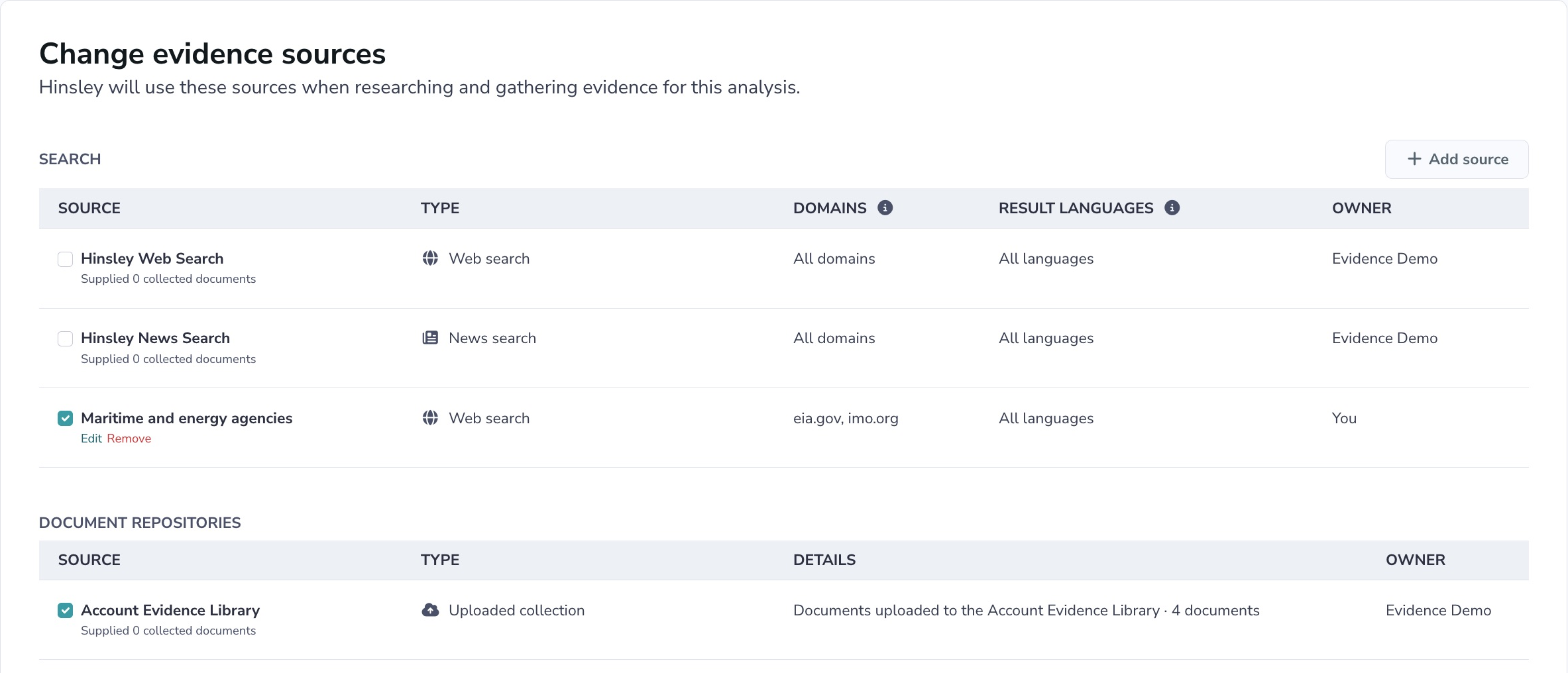
Choose the sources that inform your analysis
A research process can collect a large volume of reporting and still miss the evidence you need. Repeated claims, promotional content, and publishers with a consistent editorial position can shape the material an analyst sees. If you have decided that particular sources are unsuitable for a question, you need a way to make that decision part of the research process.
Hinsley gives you explicit controls over where research retrieves information. Select web searches, news searches, uploaded evidence collections, and connected repositories for each analysis. Create searches restricted to specified domains or exclude publishers you do not want that search to return. Then inspect the collected evidence and choose which search results should inform a particular analytical task.
Set boundaries for each research question
An analysis has a selected set of evidence sources. Its forecasting questions inherit that selection, and its scenarios and decompositions use the analysis's source settings. Standalone forecasting questions have their own source selection. You can inspect the settings with view access; changing an analysis's selection requires edit access.
Custom web and news sources support included and excluded domains. Web sources also support result-language filters. For example, you could create a source restricted to specified central-bank and statistical-agency domains, or exclude a publisher whose material you have decided not to use. These restrictions apply to that source. Review the full selection: leaving unrestricted web search selected still permits broader research.
Make source choices reusable
Account admins can create shared sources and set defaults for new analyses. Analysts can create personal search sources with domain or supported language restrictions, then select them for their work. A regional research source can therefore be reused across several analyses without re-entering the same restrictions each time.
Once a personal source is selected on a shared analysis, collaborators can see it there. Its owner controls edits to the source. Editing a reusable source affects future research wherever it is selected, so the editing screen shows its usage. You can also bring your own evidence through your Account Evidence Library or a connected Google Drive repository.
Inspect what was collected and what will be used
The source-selection page shows collected-document counts and distinguishes manual inputs, retained evidence, and documents whose legacy origins are unknown. Search Results can be filtered by evidence source. Research update summaries identify sources used when that information is available. These views help you examine where the material behind an assessment came from.
When generating a decomposition, scenarios, or a written output, you can filter the included search results by age, relevance, and source, and set a result limit. Inspect the inclusion summary and preview individual results before submitting. For example, choose recent, highly relevant reporting for an update while retaining saved evidence as context. Those filters control the search-result portion of the prompt.
Decide what happens when sources change
When you deselect a source, choose whether to keep its collected evidence or remove document connections attributed only to that source. Manually added evidence, documents also attributed to a selected source, and documents with unknown legacy origins remain. The confirmation shows what can be removed. An unavailable selected source does not cause Hinsley to substitute an unselected source.
Existing briefs, forecasts, scenarios, and conversations can still reflect evidence used before the change. Changing source settings does not rewrite that history. This distinction matters when correcting a research process: stopping future retrieval, removing collected documents, and reviewing conclusions already produced are separate decisions.
Review your boundaries for missing perspectives
Domain restrictions express your source choices. They do not certify a publisher's accuracy or remove bias from the documents it publishes. Relevance assessments help you find material connected to the question; they do not establish that its claims are true. A narrow selection can also exclude useful evidence or leave a competing explanation underrepresented.
Use these controls alongside analytical review. Inspect the documents, compare competing accounts, and revisit your selection when the question changes. Your team can make the evidence base more deliberate and explain its boundaries to colleagues. The next question is whether the sources you selected give you enough evidence to challenge the assessment you are about to make.